

Machine downtime alerts
Machine downtime alerts reach the right people straight away. In Scout you can set up e-mail and SMS notifications for any condition you define in the data received from the machines. Push notifications in the mobile app are configured for each deployment.
Example situations in which a notification can be sent:
- a machine idle for too long during working hours
- a process parameter value that is too high or too low (e.g. speed or override)
- a wrong value of any process parameter
SMS notifications are sent through an SMS gateway, also to numbers outside Poland; costs and limits depend on the gateway. They reach the shift supervisor or the maintenance team even when they are away from a computer and the Scout app.
This makes production control much easier and supports your maintenance team.
When we send machine downtime alerts
A notification condition can be, for example, a limit for machine idle time during working hours, or a range for speed or override.
Daily e-mail with the previous day’s OEE
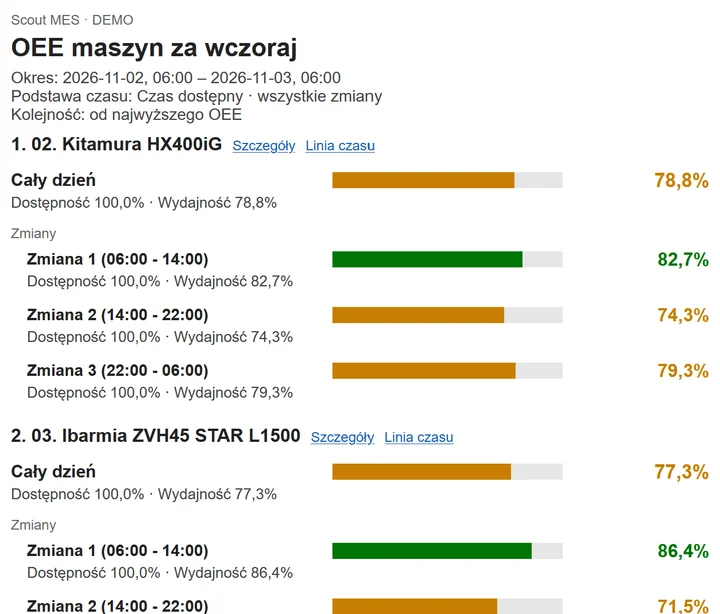
As well as event alerts, Scout sends a daily e-mail every morning with a summary of machine performance for the previous day.
For each active machine, the e-mail shows:
- OEE for the day, availability, performance and planned downtime
- a breakdown by shift: OEE, availability and performance for each shift
- colour coding: green (80–100%), orange (30–79%), red (0–29%)
- links to the machine’s details and its timeline in Scout
Machines are listed from the highest OEE down, so you can see straight away which ones performed worst. If a shift was almost entirely planned downtime, you will see “-” instead of 0%, so a planned stop does not look like poor performance.
The administrator sets the list of recipients. Everyone receives the same report covering all of the company’s active machines. The e-mail is available in English and Polish, in all plans and in the 14-day free trial, both in the cloud and on-premises.
Frequently asked questions
Yes. Every morning, Scout sends an e-mail with the OEE, availability and performance of every active machine for the previous day, broken down by shift.
For each machine: OEE for the day, availability, performance and planned downtime, plus the same figures for each shift. Results are colour-coded, machines are listed from the highest OEE down, and links take you to the machine’s details and timeline in Scout.
The people on the recipient list set by a Scout administrator. Every recipient gets the same report covering all of the company’s active machines.
By e-mail, and by SMS through an SMS gateway, when a machine is idle too long during working hours or a process parameter goes out of range. Push notifications in the mobile app are configured for each deployment.
Yes. It is available in all plans, including the 14-day free trial, both in the cloud and on-premises.