

In brief
- Production monitoring is a live check of the shop floor: which machines are running, which are stopped, why, and how that compares with the plan.
- You can collect the data by hand (job cards, spreadsheets), with a camera, or automatically in a MES, straight from the control.
- Scout MES reads the LAN, using the control’s own protocol or a standard such as OPC UA, MTConnect or Modbus TCP, with no extra sensors on CNC machines.
- From the machine, Scout reads status, the program, speeds and override. The operator adds the job, OK/NOK and the reason for downtime.
- Conventional machines are connected with the BIOS-IO-01 module (digital inputs). We connect popular CNC controls within minutes.
Production monitoring is the ongoing collection of what is happening on the shop floor: which machines are running, which are standing, why, which program and job are in progress, and how many parts are done. Useful production monitoring shows this at the time, not the next day from sheets copied into a spreadsheet.
Below we compare three ways to monitor production, list what you can take from the machine and from the operator, and show how production monitoring works in Scout MES, together with production scheduling and the operator panel.
What is production monitoring?
Production monitoring is a continuous measurement of machines and people on the shop floor, set against the plan. It answers three questions: what is happening now, what happened on the previous shift, and why a machine stopped. In a MES such as Scout, the data comes from the control, so nobody has to write it down.
Production monitoring is not the same as real-time machine monitoring. Machine monitoring tells you the state of each machine. Production monitoring adds jobs, operators, shifts and the plan. Without that context, a status of “running” or “idle” does not tell a supervisor which job is waiting.
Production monitoring methods: by hand, by camera or from a MES
| Method | How it works | When the data is available | Weak points |
|---|---|---|---|
| By hand (job cards, spreadsheets) | The operator writes times, parts and stops at the end of the shift | After the shift, often days later | Memory, mistakes, short stops disappear, someone has to retype it |
| Camera | A picture of the shop on a screen | At once, but only as a picture | Someone has to watch; a camera does not name the program or count finished parts |
| Automatic, from a MES | The system reads the control | In real time | The machines need a LAN; some controls need an option on the machine |
We use the third method: automatic production monitoring from the machine itself. The figures are in the system at once, and the operator only adds what the machine cannot know: the job, the part result and the reason for the stop.
What data does automatic production monitoring collect?
Data straight from the machine
From a CNC or a PLC, Scout reads, among other things:
- status: running, idle, offline, and since when;
- the program or recipe in progress, and through it the job;
- speeds, for example feed, spindle speed or line speed;
- feed and spindle override;
- alarms;
- on some controls, a part counter and spindle load;
- selected values from the PLC memory.
The set depends on the control. The lists sit on the CNC machine connectivity pages.
Data from the operator
Some facts never leave the control, because they were never in it. On the operator panel, on a tablet or a PC at the machine, the operator picks the job, marks the part OK or NOK, and reports a changeover or a breakdown. A call for material, or a breakdown call, can also come from a BIOS-UX-02 andon box with four buttons. Scout joins that input with the machine data, so a stop has a reason, not only a duration.
What you see during the shift
- The shop, live. Each machine has a coloured status, the employee, the job and the current process values. The view can go on a television on the floor.
- History. The timeline shows states, stops, the program, the operator and the job for the period you pick.
- OEE software calculates availability, performance and quality for the machine, the shift, the employee and the job.
- Machine downtime alerts go out by e-mail or SMS when a machine stands too long or a value leaves its range. Push notifications are configured for each deployment.
That is production monitoring in practice: the supervisor does not walk the floor with a notebook to find which machine stopped, since when, and why.
How production monitoring works in Scout
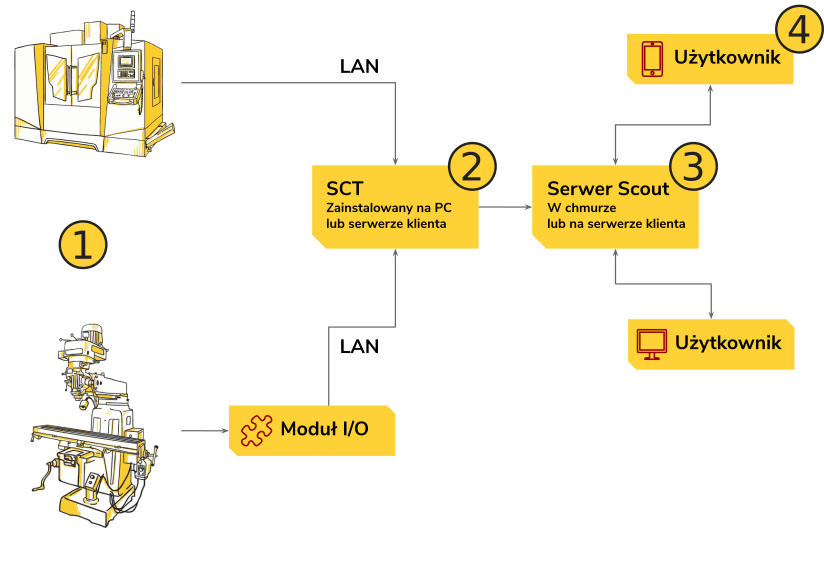
Scout reads the controller over the factory LAN. For each control we use its protocol (for example FOCAS2 on Fanuc) or a standard such as OPC UA, MTConnect or Modbus TCP. On supported CNC and PLC controls that are already on the LAN, we do not fit sensors and we do not open the electrical cabinet.
SCT (Scout Configuration Tool) receives the data: a set of console applications that run in the background as Windows services on a PC or server in your network. SCT sends the data to Scout over HTTPS. The machines do not need internet access. The path is described under machine data collection.
Which machines can be connected?
| Machine | How we read it | Examples |
|---|---|---|
| CNC machine tools | From the control, over the LAN | Fanuc, Heidenhain, Siemens, Haas, Mazak, OKUMA, Mitsubishi, Citizen, DMG MORI, OSAI, cncGraF / InfoCAM |
| Lines and machines on a PLC | From the PLC or through a standard | Siemens S7 (S7 TCP), Beckhoff (TwinCAT), Omron (FINS, C-Mode), Modbus TCP, OPC UA, MQTT |
| Robots | From the robot control | Fanuc robots, Yaskawa |
| Lasers, press brakes and other machines with their own control | From the control, a status or a production file | Trumpf Laser, Bystronic, Kimla UDP, Safan, Delem |
| Conventional machines (no CNC) | BIOS-IO-01 digital inputs, for example a run signal from the signal tower, over the LAN | Legacy machine monitoring |
| Welders | BIOS-CT-01 detects that the welder is working from its current draw; data goes through BIOS-IO-01 and the LAN | Welding machine monitoring |
Some controls are ready once the machine is on the LAN. Others need an option on the machine. Mazak needs the MTConnect option. If a Siemens Sinumerik has no OPC UA option, we read it over S7 TCP. Before we start, we check your machines and propose the connection. We do not publish a fixed count of controls.
How to start production monitoring
- A machine list. Write down the machines, their controls and their IP addresses on the LAN.
- A Windows PC. Prepare a PC or server on the same network (Windows 8/10 or Windows Server 2012 or later, .NET Framework 4.8, 2 cores, 4 GB RAM) and give us temporary remote access.
- Configuration. We do the rest remotely: we install and configure SCT, and we connect popular CNC controls within minutes.
- The trial. For 14 days you run Scout MES on your own machines, at no cost and with no obligation. Prices are on the pricing page.
Scout MES already monitors over 1,900 machines for over 130 customers. If you want the wider picture of how monitoring is rolled out, start with the guide to automatic machine monitoring. Guides on this subject are collected under production monitoring and planning.
On this topic
- Production planning in 4 steps — how shop-floor data turns into the next plan.
Questions
It is the ongoing collection of data about machines and people on the shop floor, compared with the plan: what is running, what is stopped, and why.
Machine monitoring shows the state of each machine. Production monitoring adds jobs, operators, shifts and the plan, so you see which job is waiting, not only that a machine is idle.
No. The machines stay on the LAN. SCT on a Windows PC in your network sends the data to Scout over HTTPS. You do not open inbound ports.
Yes. We connect them with the BIOS-IO-01 module: digital inputs, for example a run signal from the signal tower, data over the LAN only.
Current cloud prices and the on-premises quote are on the pricing page. The 14-day cloud trial is free.
You connect the machines to the LAN and prepare a Windows PC. We install and configure SCT remotely, and we connect popular CNC controls within minutes.
Not sure where to start? We will help.
Contact us to start a free 14-day trial of Scout MES.